The Ultimate Outline: CreatorTools.us Introduction
March 15, 2026 · 3 min read
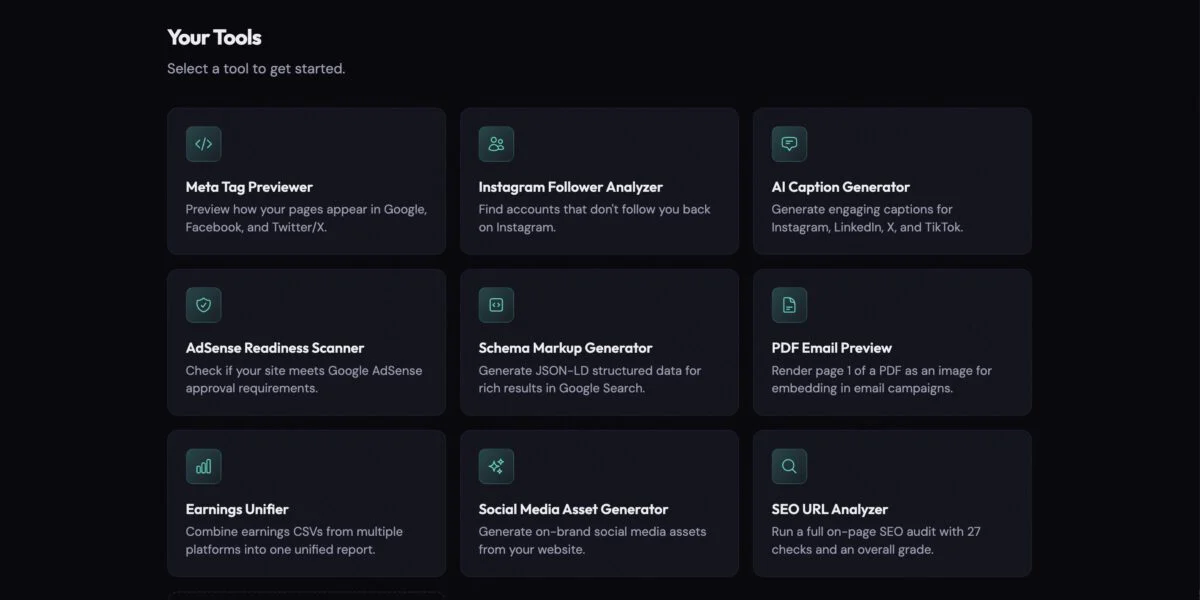
I’ve been working on the web for almost 30 years. Never have I seen so many people enabled to create and share their interests with the rest of the world. One of the biggest hiccups I can see is that the web isn’t really suited to handle users without prior knowledge or an agency behind them. The internet has been alive and growing quickly for a very long time. It’s not the kind of environment you can jump into and succeed easily. There are a LOT of tools designed to help accomplish the everyday tasks but most of them are bloated and unnecessary for content creators. You’d likely end up signing up for three services, at least, each providing 10 tools. Of which, you only need one.
This is where CreatorTools comes in. The idea being that the tools are highly focused, easy to use, and not reliant on years of experience to use. You visit the site, filter by what you need, and use it. No instruction manual, no signup, just tools that work in your browser.
Using my own struggles as an example
The tools that exist on the site today represent tasks that I myself have struggled with. Things that, in all my days, I’ve never fully come to grips with or even pet-peeves that I couldn’t find a solution already in place to handle.
Improving your chances of being accepted to Google Adsense
This is the one that has bothered me for years. I don’t like ads, I never have. They don’t bother me on websites as long as they aren’t overwhelming, I just always found the nuances of displaying them to be odd. So it makes perfect sense that attempting to monetize a blog through AdSense would also plague me. I’ve had the same personal site for nearly 20 years. There’s tons of content, none of it written by AI. No problem… Rejected.
The reasons were vague at best so, I passed an AI with the task of researching the AdSense policies and requirements. When that was done, I built a tool to scan a website, compare it to those policies and requirements, and present a score representing the likelihood that the AdSense team will even consider a website. If it’s missing things, there are tips on what to do to improve your chances. Of course, there’s no guarantee, but it’s a damn-site more transparent and easier to understand.
Helping Google know how to represent you
This is one of the things that most web professionals know, and understand its value, but the average user knows absolutely nothing about. “Schemas” help Google understand what your content is about and can change the way it displays your content in its results. It’s common for SEO platforms and plugins to generate these things automatically but I doubt it’s the kind of thing a creator would know to look for.
The Schema Markup Generator removes some of that mystery and provides a simple interface for creating schemas. Pick the type of content, answer a few questions (which it can attempt to auto-fill for you if you already have a publicly accessible URL), and generate the schema. It’s about as easy as it could be.
Ghost followers
This one if the pet-peeve I mentioned earlier. I don’t consider myself a content creator as such but I do have social accounts that I use to share content with those who are interested. They are public so I do occasionally pick up new randoms as followers. I’m perfectly content to follow them back in what I consider a fair exchange. However, I’m not OK with the ones that immediately unfollow accounts once they’ve got the new follower they wanted. I assume most people don’t care, but I do.
Unfortunately, Instagram/Meta hasn’t build a solution for this yet and their APIs are less than useful in this case. They do however provide a means for us to “export” our account info and I can use this to find those pesky hitchhikers. None of the information is ever sent to the server, it all sits in your browser for privacy. You upload your export ZIP file and it analyzes the “follower” and “following” data to display the accounts you follow that don’t follow you back. You can click the username to open it account in a new window and click that handy “Unfollow” button.
I also added “Ignore” and “Hide for 30d” buttons so you could ignore the celebrity or brand accounts that aren’t likely to ever follow you back (they get a pass) and “snooze” the accounts that might be under review and you can’t unfollow at that time. If you come back and upload another fresh export ZIP after the 30 days and they haven’t been removed from IG, you’ll see them again and can try to unfollow them then.
We’re all humans here
Just because it’s been designed to work for a human doesn’t mean it’s going to work for all humans. If you hit a snag or see an error, reach out. We’ll ask that you be patient, there’s no AI answering machine at this point, but we’re also quite interested in what users have to say.
If you get stuck, fill out this quick form, and someone will personally help you get over the hurdle.
Getting started
Go take a look at the tools. Filter by category or platform or just browse around. Try them out, take care of your tasks. If something goes sideways or you encounter an error, let us know, and we’ll fix it together. Don’t see what you’re looking for? Reach out about that too! We’re always looking for new challenges to overcome and, if we can help someone else, that’s even better.